Tuesday, December 7, 2010

Wiimote and GlovePIE

I went through some old stuff I had in boxes and I dug up two things that I thought were very useful.
  1. An Old Bluetooth Headset.
  2. A Nintendo Wiimote.

Friday, December 3, 2010

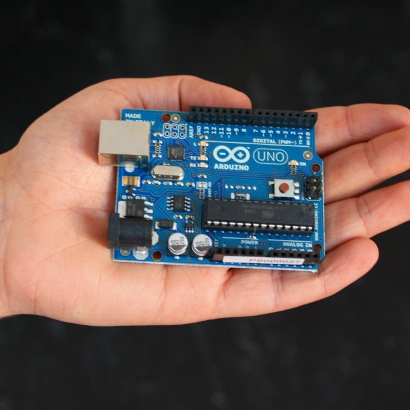
Unboxing the Arduino Uno

"Arduino is an open-source electronics prototyping platform based on flexible, easy-to-use hardware and software. It's intended for artists, designers, hobbyists, and anyone interested in creating interactive objects or environments." - arduino.cc

Unboxing the MSP430 eZ430-RF2500

I really wanted to experiment with some wireless sensor networks, so I went looking about a year back. One of the Texas Instruments Reps was gracious enough to lend me his demo kit and well I wanted to show it off. There is a new kit available from TI nowadays, but don't know if I will be getting one for Christmas this year.
Here is the eZ430-RF2500.

Monday, November 29, 2010

Timing is Everything: Controlling Lights based on time

I have had this thing for a long time and I have been sitting on the idea 'cause this project is in the testing phase. The problem to which this solution come to is as follows. Every evening, my mom would repeatedly ask me to turn the porch lights on and almost every other day, the lights would still be on because no one switched them off. Well I thought it was an incredible waste of energy(and my time) to manually control the lights. So I decided to put a little microcontroller in-charge of it.
I have been really busy in the office for the last year and when I came back home last winter, I found a box full of microcontrollers and other stuff lying around. About an hour spent on paper, I was happily coding away with my laptop as I tested out my routines for the RS232 UI and I2C Bus. 
For this project I used 
  1. An AT89C4051 -20 Pin uC(8051 Core) with 11.0592 Mhz Crystal, 
  2. DS1307 RTC and 
  3. A relay with the driver TIP122
The DS1307 serial real-time clock (RTC) is a low-power, full binary-coded decimal (BCD) clock/calendar plus 56 bytes of NV SRAM. Address and data are transferred serially through an I²C, bidirectional bus. The clock/calendar provides seconds, minutes, hours, day, date, month, and year information. The end of the month date is automatically adjusted for months with fewer than 31 days, including corrections for leap year. The clock operates in either the 24-hour or 12-hour format with AM/PM indicator. The DS1307 has a built-in power-sense circuit that detects power failures and automatically switches to the backup supply. Timekeeping operation continues while the part operates from the backup supply.

A Tutorial is given at http://www.sixca.com/micro/mcs51/rtc_51/ and a link to the keil sample code for the I2C bus is also given, I used a slightly modified code which I will put up on code.google.com once I get everything together. For now it's on my CVS server at my home office where I working from. 

I made the prototype by hand soldering the PTH components on a general purpose PCB and the housing is... well ... less than conventional.

Sunday, November 28, 2010

Tweeting Kegerator By Sparkfun- An Inspiring project :)

A pint of beer fresh from the SparkFun kegerator.
Mmmm SparkFun Beer

Follow the SparkFunKeg on Twitter

Download web pages in BASH: From binkley's BLOG

BASH is quite amazing. From Bhaskar V. Karambelkar comes Bash shell tricks and this gem (with some small corrections):
function headers()
{
    server=$1
    port=${2:-80}
    exec 5<>/dev/tcp/$server/$port
    echo -ne "HEAD / HTTP/1.0\r\nHost: $server:$port\r\n\r\n" >&5
    cat <&5
    exec 5<&-;
}
I work behind a corporate firewall, so I need web proxy settings. No problem, BASH is still amazing:
function webget()
{
    declare -a parts
    parts=($(echo $1 | tr / ' '))
    protocol=${parts[0]}
    server=${parts[1]}
    path=$(echo $1 | sed "s,$protocol//$server,,")

    exec 5<>/dev/tcp/$http_proxy_server/$http_proxy_port
    echo -ne "GET $path HTTP/1.0\r\nHost: $server\r\n\r\n" >&5
    cat <&5
    exec 5<&-;
}
Usage is obvious:
$ webget http://www.ccil.org/jargon/
# Out pops the top page for Jargon File Resources
UPDATE: Also useful for talking to SMTP (email) servers:
$ exec 5<>/dev/tcp/localhost/smtp
$ read -u 5 line
$ echo $line
220 my.full.host.name ESMTP ...
$ echo QUIT >&5
$ read -u 5 line
$ echo $line
221 2.0.0 my.full.host.name closing connection
This also shows that BASH knows to map the SMTP service to port 25

Friday, November 26, 2010

binkley's BLOG: Download web pages in BASH

binkley's BLOG: Download web pages in BASH: "BASH is quite amazing. From Bhaskar V. Karambelkar comes Bash shell tricks and this gem (with some small corrections): function headers() {..."